Instructions for OFDM Modulation with 16-QAM
- Note: Use the input fields to enter the number of OFDM symbols, number of subcarriers, cyclic prefix length, and SNR (in dB).
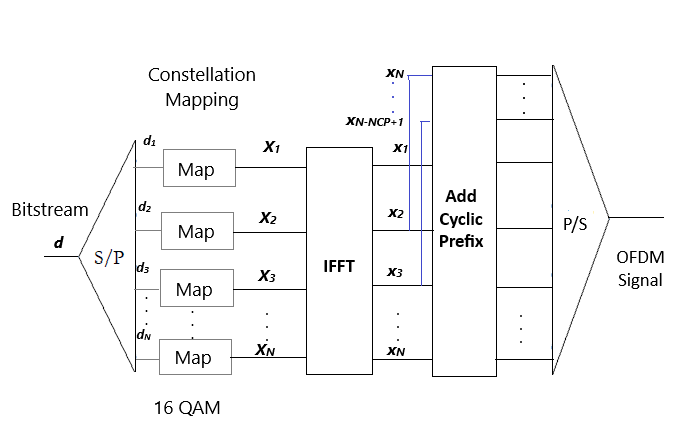
- Step 1: Click on the 'Generate Message' button to generate the input bitstream for modulation.
- Step 2: Click on the 'Generate Subcarrier' button to map the generated data bits into subcarriers using 16-QAM modulation.
- Step 3: Click on the 'Time Domain OFDM Without CP' button to perform IFFT and obtain the time-domain OFDM signal without adding a cyclic prefix.
- Step 4: Click on the 'Time Domain OFDM With CP' button to add the cyclic prefix to the time-domain OFDM signal, simulating a practical OFDM frame structure.
- 16-QAM Modulation: Each group of 4 bits is mapped to one of 16 predefined complex constellation points using Gray coding. The constellation points are:
(-3, -3), (-3, -1), (-1, -3), (-1, -1),
(-3, 3), (-3, 1), (-1, 3), (-1, 1),
(3, -3), (3, -1), (1, -3), (1, -1),
(3, 3), (3, 1), (1, 3), (1, 1)
Each point corresponds to a unique 4-bit symbol. For example, the binary data0000maps to(-3, -3),0001to(-3, -1), and so on. Gray coding ensures that adjacent points differ by only one bit to reduce bit errors. - Subcarrier Output: The subcarrier output represents the absolute (magnitude) values of the QAM-modulated subcarriers before IFFT is applied.